Thursday, May 12, 2022
Groovy Script to read the data whenever C4C sends SAP_UUID or not. If SAP_UUID is not able then it will store Payload Logging using Groovy Script.
Wednesday, April 27, 2022
Groovy Script to read the data in the same field level and send it all values in one field.
Using Groovy Scripts to read the same field level and send it all values in one field.
Read the input value in field name -SAPScriptLineText
Input:
<SAPScriptLineText>BG AV 302 LED BG AV 302 LED BG AV 302 LED BG AV 302 LED BG AV 302 LED BG</SAPScriptLineText>
<SAPScriptLineText>AV 302 LED BG AV 302 LED BG AV 302 LED</SAPScriptLineText>
Output:
<SAPScriptLineText>BG AV 302 LED BG AV 302 LED BG AV 302 LED BG AV 302 LED BG AV 302 LED BG AV 302 LED BG AV 302 LED BG AV 302 LED</SAPScriptLineText>
Example:
Friday, April 8, 2022
Groovy Scripts to read the date and time and reduce -5:30 hrs of date and time.
Using Groovy Scripts to read the date and time and reduce -5:30 hrs of date and time.
Read the input value in property name -ActivityStartDate
Example:
import com.sap.it.api.mapping.*;
import com.sap.gateway.ip.core.customdev.util.Message;
import java.util.HashMap;
import java.text.SimpleDateFormat;
import java.util.TimeZone;
import java.time.LocalDateTime;
import java.time.format.DateTimeFormatter;
def String customFunc(String arg1)
{
DateTimeFormatter formatter = DateTimeFormatter.ofPattern("yyyy-MM-dd'T'HH:mm:ss'Z'");
def currentTime= arg1;
LocalDateTime datetime = LocalDateTime.parse(currentTime,formatter);
datetime=datetime.minusHours(5).minusMinutes(30);
return datetime;
}
(OR)
import java.util.HashMap;
import java.text.SimpleDateFormat;
import java.util.TimeZone;
import java.time.LocalDateTime;
import java.time.format.DateTimeFormatter;
def Message processData(Message message) {
//Body
def body = message.getBody();
//Properties
map = message.getProperties();
value = map.get("ActivityStartDate");
DateTimeFormatter formatter = DateTimeFormatter.ofPattern("yyyy-MM-dd'T'HH:mm:ss");
def currentTime= value;
LocalDateTime datetime = LocalDateTime.parse(currentTime,formatter);
datetime=datetime.minusHours(5).minusMinutes(30);
message.setProperty("CurrentDate",datetime);
return message;
}
Input:
3:00 PM 09-04-2022
3:00 AM 09-04-2022
Output:
9:30 AM 09-04-2022
9:30 PM 08-04-2022
Wednesday, February 23, 2022
Split one field value using groovy script and sent to two output fields in SAP CPI
Split the value from one input field using space and return to two output fields.
Groovy Scripts:
import com.sap.it.api.mapping.*;
def void ReadNames(String[] ID,Output Fname ,Output Lname,MappingContext context)
{
def Fname_L = ID[0].substring(0,ID[0].indexOf(' '));
def Lname_L = ID[0].substring(ID[0].indexOf(' ')+1, ID[0].length())
Fname.addValue(Fname_L);
Lname.addValue(Lname_L);
}
(or)
import com.sap.it.api.mapping.*;
def void substring_value(String[] CC, Output output, MappingContext context)
{
String[] list = CC[0].split(" ");
if (list.length > 0)
{
for (int j = 0; j < list.length; j++)
{
output.addValue(list[j]);
} }
}
Input-Ramesh Kumar
Output:
First field-Ramesh
Second field-Kumar
Friday, February 4, 2022
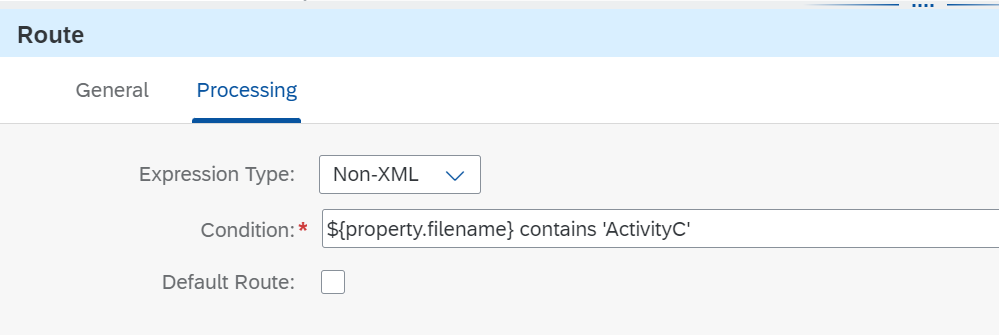
Two files in SFTP will have different headers in CSV format.
* There will be 2 files in sftp 1. Create and 2.Update both files will have different header in CSV format.
* Create file will have 7 header and the update file will have 3 header.
Example :
Create filename - ActivityCFile
Update filename-ActivityUpdateFile
Step:1
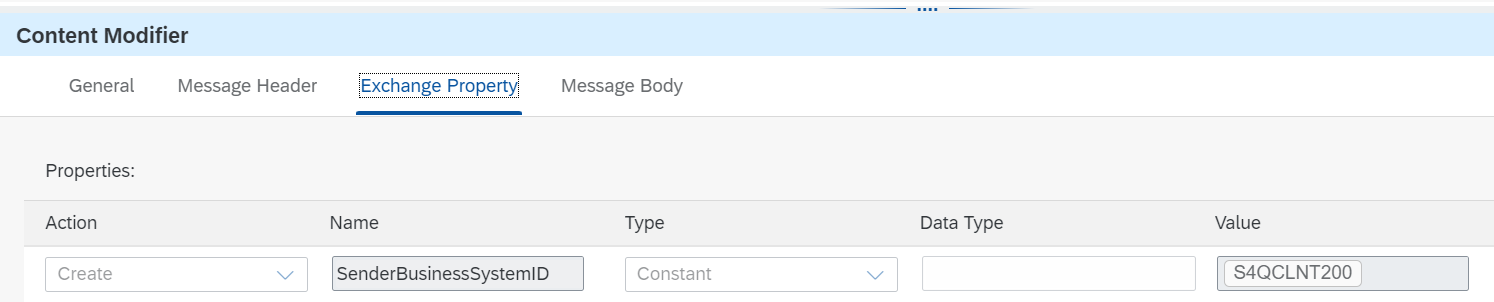
In Content Modifier read the sftp file name using ${file:onlyname.noext},
Thursday, February 3, 2022
Externalizing a parameter in content modifier and using inside Message Mapping Field level for dynamically
Instead of using an external parameter type, use either “Constant” or “Expression” type within content modifier. And in the value column, define the external parameter.
Example:
Using groovy script, we can access inside Mapping field level dynamically value.
import com.sap.it.api.mapping.*;
def String ReadExternalProperty(String P1,MappingContext context) {
String messageID = context.getProperty(P1);
return messageID
}
(or)
import com.sap.it.api.mapping.*;
import com.sap.it.api.mapping.MappingContext;
def String getProperty(String property_name, MappingContext context) {
def propValue= context.getPropery(property_name);
return propValue;
}
In mapping, we need to use groovy script and call field names maintained in Content modifier.
Monday, January 31, 2022
We can check ACTIVITY_NO is empty or not using Node Function in SAP CPI
Using below node function,
Example:
1. Activity_No or Ticket ID is empty go to Create state(From C4C side will be ActionCode) ----> 01
2. Activity_No or Ticket ID is not empty go to update state(From C4C side will be ActionCode) --->02
The sender will pass the data in JSON format without converting it to XML format. We need to read the particular field.
The sender will pass the data in JSON format without converting it to XML format. We need to read the particular field to check the conditio...
-
For the future reference, we have a script to save the payload in the iflow and that can be viewed in the Tenant . Go to Monitoring page in ...
-
We had a requirement to remove the special characters in the field using groovy script. Groovy Script: import com.sap.gateway.ip.core.custo...
-
Random UUID generator in SAP CPI using Groovy Scripts Assign constant and add the groovy script in Message Mapping and map the UUID field i...